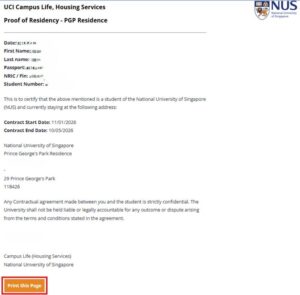
You may now download your Proof of Residency (POR) directly via the Student Portal. The POR will be generated for bookings under “In-Room” status (check-in) and/or “History” status (check-out).
Kindly note that the dates reflected are based on your approved booking period.
If you have any questions, please approach your respective Front Desk (FD) for assistance.
1.Log in to the Student Portal.
2. From the top navigation menu, click on “Proof of Residency.”

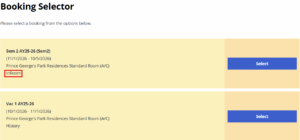
3. From the Booking Selector page, click “Select” for the relevant booking to generate your POR.
4. Click “Print this Page” to print your POR.
*For printing purposes, please use a desktop for better formatting.*
To enjoy the full experience, please upgrade your browser
Try this browser